
Each week
Set Up Your Weekly Golf Game
Your players and golf courses are already in Grey Tabby Golf. Now you're ready to organize your next event.
Create a new event, or save time by repeating a previous one. Choose the competitions your group will play, configure the buy-in and prize pools, and you'll be ready to invite your players.
Create a New Event
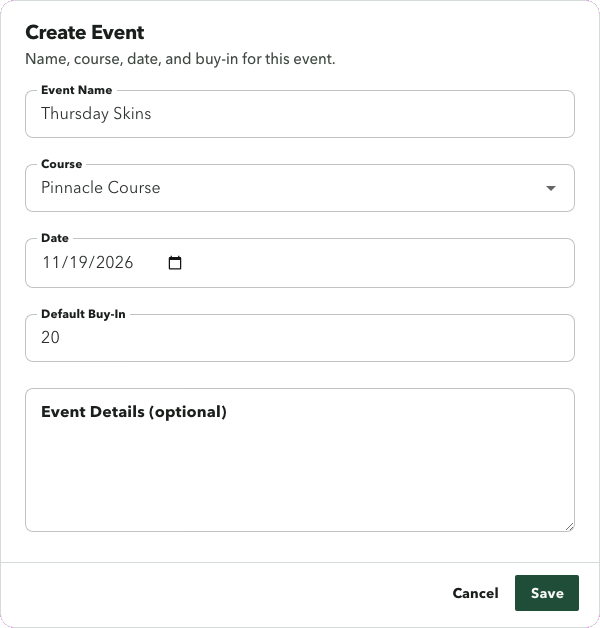
From the Events page, click Add Event.
Give your event a name, select the golf course, choose the date, and enter the buy-in amount. You can also include additional details or instructions.
After creating the event, set the round's starting time and configure the competitions.
You don't need to enter your players again. Your existing player roster is available whenever you organize a new event.
Save Time with Repeat Event
Does your group play the same course and competitions most weeks? Repeat Event saves you from setting everything up again.
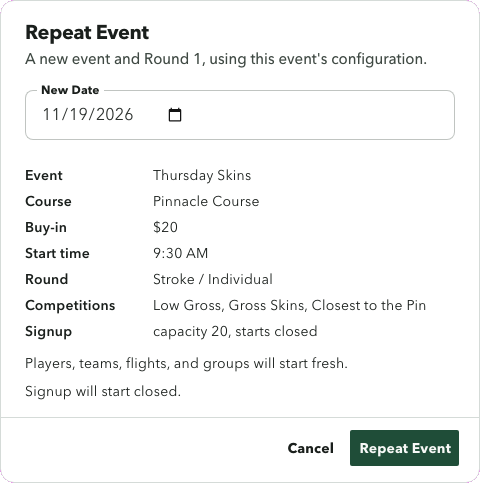
Find a previous event on the Events page, select Repeat Event, and choose the date for your new game.
Grey Tabby Golf carries forward the previous event's course, starting time, buy-in, and round-level competitions, including their prize-pool settings. If you've configured Closest to the Pin, those holes and purses carry forward too.
Your signup capacity, instructions, and choices are also retained, along with applicable event notes and round settings.
Each repeated event starts fresh where it matters. Previous registrations, flights, playing groups, tee assignments, scores, and published results aren't copied. Signup begins closed, so you decide when to invite players.
Once players respond, you can automatically assign flights and generate playing groups for the new round.
Choose Your Competitions
Every group has its favorite games. Grey Tabby Golf lets you configure several competitions for the same round, including:
- Gross Skins and Net Skins
- Low Gross and Low Net
- Nassau
- Final 4 Net
- Deuces
- Closest to the Pin
Choose which competitions to include and configure how their prizes are funded. Supported options include using the shared event pool or allocating dedicated amounts from the buy-in.
The best part is that players don't need a separate scorecard for every game. Grey Tabby Golf uses the same hole-by-hole scores to calculate the configured competitions. Closest-to-the-pin measurements are recorded separately.
For more details, explore the Competitions page or see how Gross and Net Skins work.
Ready to Invite Your Players?
Your event is now set up. When you're ready, open signup and send invitations to your group.
Players can respond using their magic links or remembered sessions. As registrations come in, you'll see who's playing, who's out, and who's on the waitlist.
You can then automatically assign flights, generate playing groups, and prepare tee times based on the golfers participating that week.
Start a 30-day free trial
A payment method is required. Billing starts when the trial ends unless you cancel.